Regulations using Backlog
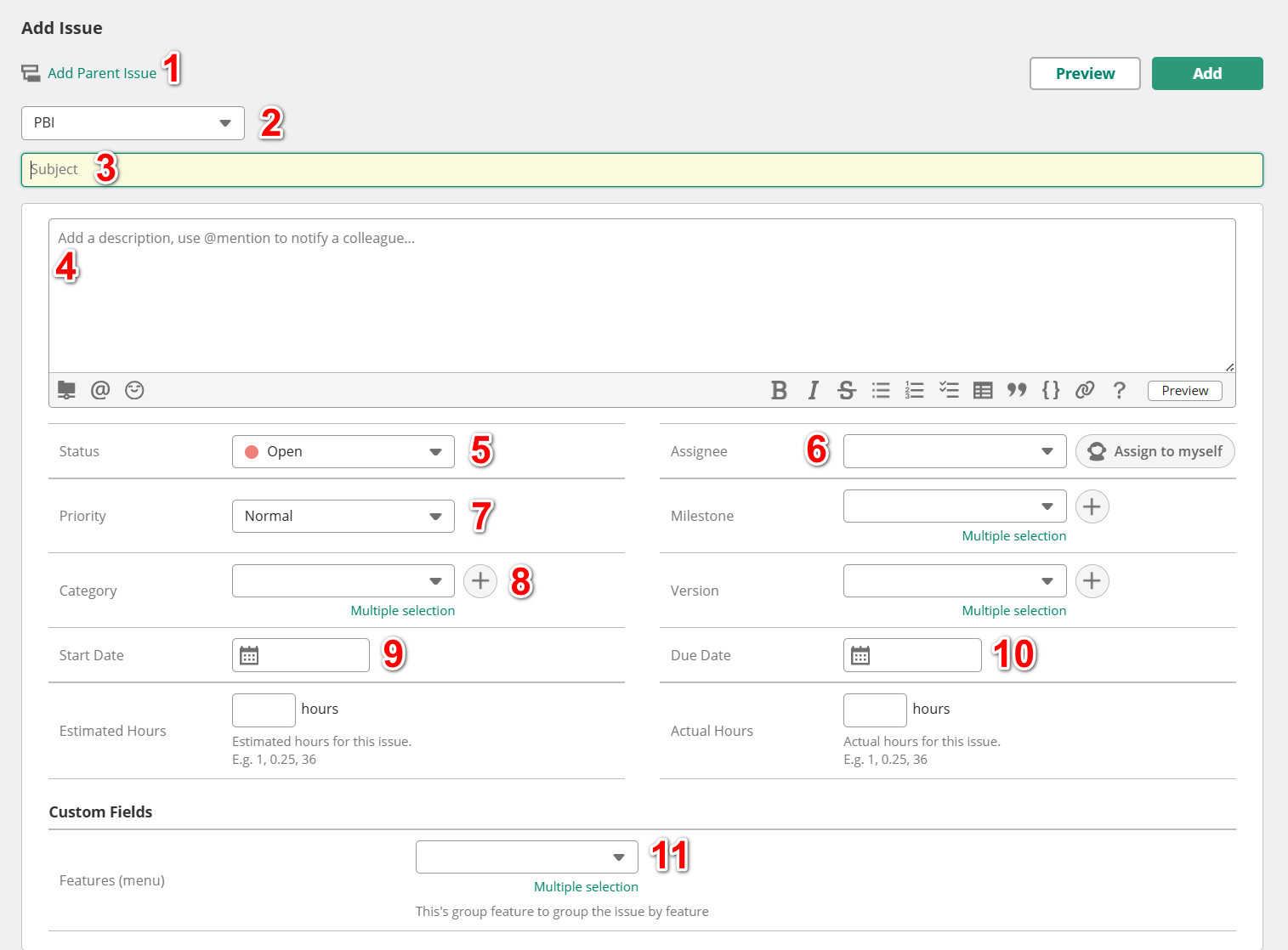
Explain information:
- Parent issue: Select the parent issue for the issue about to be created. Select required for issues whose Issue Type is not PBI.
- Issue Type: Categorize issues by type. The list of issue types includes:
- PBI - Project Backlog Issue: Select this type when you create a new issue.
- Requirement: Select this issue type when you create a child issue of PBI to reading/understanding/confirming requirements
- Implement: Select this issue type when you create a child issue of PBI to do work.
- Bug: Select this issue type when you create a child issue of PBI to fixing bug.
- Review Code: Select this issue type when you create a child issue of PBI to review
- Debugging: Select this issue type when you create a child issue of PBI to debugging and feedback
- Refactor: Select this issue type when you create a child issue of PBI to refactoring source code.
- Research: Select this issue type when you create a child issue of PBI to research on how to do the task.
- Subject: Write a summary of the work you will do. Maximum 72 characters.
- Description: Please write fully and in detail about the work you will do according to the sample.
- Status: Status of the issue to manage the work process. Regularly update issue status while working. Issue status includes the following types:
- Open: Select this status when you create an issue and do not do so immediately.
- In Progress: This status is for Issue Type PBI only. Select when to start the job.
- Processing: This status is only for Issue Types that are not PBI. Select when to start the job.
- Resolved: Select this status when you have completed work but have not released it yet.
- Closed: Select this status when the job is completed and released.
- Assignee: Choose an engineer to do the job.
- Priority: Choose the job's priority.
- Category: Select the category of the job. Category bao gồm"
- Features
- Bug
- Hotfix
- Refactor
- Document
- DevOps
- Research
- Start Date: Select work start date.
- Due Date: Select the expected date for completing the work.
- Features (menu): Select which job features will be affected. Multiple features can be selected.
Example:
